
Custom Log Categories
There are many ways to debug inside of Unreal, from using the debug tools provided to chucking print strings around. To make the usage of logging, such as the UE_LOG macro, you can add custom log categories to allow for better understanding where they are coming from.
Implement Custom Categories
To create custom categories, you first need to add the DECLARE_LOG_CATEGORY_EXTERN() macro, which allows you to declare a new log category with a name, default verbosity and compile-time verbosity.
            #pragma once

#include "CoreMinimal.h"

/** Log categories to be used across the project */
DECLARE_LOG_CATEGORY_EXTERN(LogBlog, Log, All);
DECLARE_LOG_CATEGORY_EXTERN(LogBlogController, Log, All);
DECLARE_LOG_CATEGORY_EXTERN(LogBlogCharacter, Log, All);
DECLARE_LOG_CATEGORY_EXTERN(LogBlogActor, Log, All);
Inside the C++ file, you need to define the log category, which will then create a FLogCategory with the name you provide, so you can use that as a custom log category.
            #include "Blog.h"

/* Defined log categories */
DEFINE_LOG_CATEGORY(LogBlog)
DEFINE_LOG_CATEGORY(LogBlogController)
DEFINE_LOG_CATEGORY(LogBlogCharacter)
DEFINE_LOG_CATEGORY(LogBlogActor)
Using Custom Categories
To use the categories, you will need to use the macro UE_LOG to be able to print to the log. This macro can take in your custom log name that can be used by including the Blog.h file, which includes the declarations of the custom categories. It then can take in a verbosity enum, which can be your default one or can be one of the others defined inside of LogVerbosity.h. You can then add whatever you want to print to the log/screen.
            #include "CustomBlogActor.h"
#include "Blog.h"

// Called when the game starts or when spawned
void ACustomBlogActor::BeginPlay()
{
	Super::BeginPlay();

	UE_LOG(LogBlog, Log, TEXT("This is a custom log category!"));
	UE_LOG(LogActor, Warning, TEXT("This is another custom log category!"));

	//...

}
Finding Log Categories
To find the categories quick and easily, you can open the output log and use the filter area to filter to the recently created categories. This will make it easier to find them and get rid of other items.
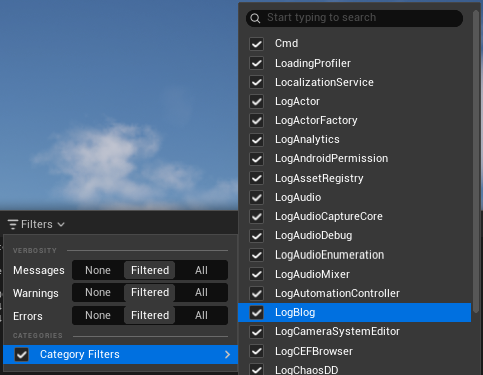
After selecting the created categories, you can see them by themselves inside the output log without all the fluff around them.

Overall
You can now implement custom log categories into your project so you can keep the logs cleaner and more organised. This is a really good feature to implement at the start of your project, as it gives you the ability to use the categories throughout your project from day one. You can use them however you want, from creating a couple and using them repeatedly, or creating one per file to make sure the logging is as verbose as it can be.
On This Page